Microsoft Excel is a very powerful
tool for you to use for numeric computations and analysis.
Excel can also function as a simple
database but that is another class. Today we will look at
How to get starting with Excel and
show you around the neighborhood sort of speak. I hope to
See you in one of the intermediate
classes later on.
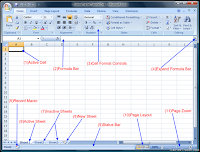
Working with workbook and worksheet
Information in Excel is stored in a Workbook.
The first new workbook opened in a session is called Book1. A workbook is a
collection of individual Worksheets. Each worksheet has a name that appears in
a Worksheet Tab at the bottom of the workbook window. By default, these names
appear as Sheet1, Sheet2, Sheet3, etc. You can change the default names, if
desired
Entering data (text,Number)
You have several options when you want to enter data manually in Excel.
You can enter data in one cell, in several cells at the same time, or on
more than one worksheet at once. The data that you enter can be
numbers, text, dates, or times. You can format the data in a variety of
ways. And, there are several settings that you can adjust to make data
entry easier for you.

